
WhatsApp after-hours auto-reply and no-reply follow-up rules for sales teams
How to set up a WhatsApp after-hours auto-reply and a no-reply follow-up rule for a sales team, with sample messages in English, Roman Urdu and Arabic.

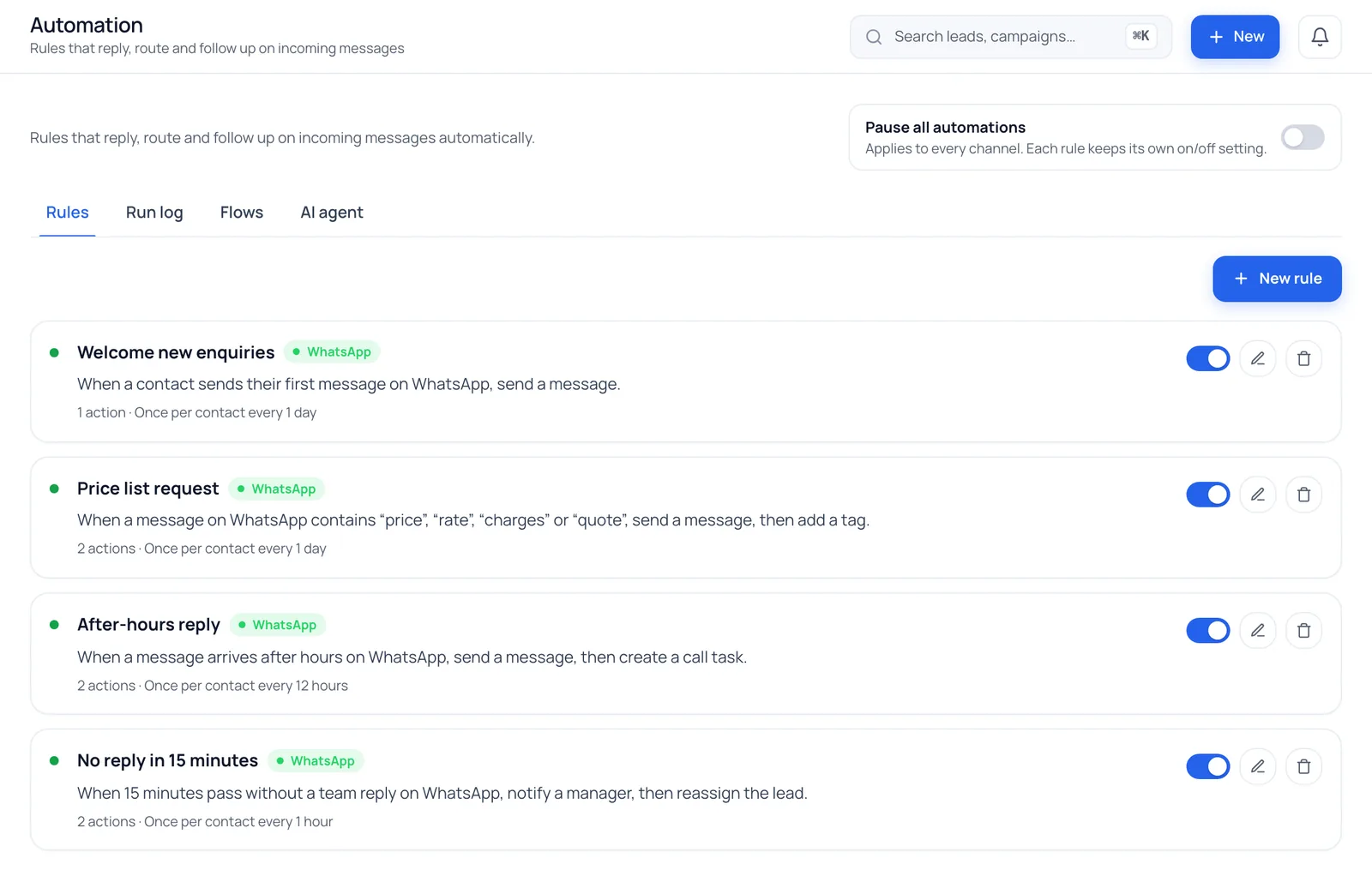
Two rules cover most missed WhatsApp enquiries: an after-hours reply that tells the customer when a person will answer, and a no-reply rule that alerts a manager when a chat sits unanswered. Keep both short, honest and tested before you switch them on.
A customer sees your ad at 11 pm, taps through to WhatsApp and asks about price. Nobody is at the office. The next message they send is to your competitor, who replied. The opposite problem happens in office hours: a chat arrives, the agent who owns it is on a call, and the customer waits an hour without a word.
You cannot staff WhatsApp all night, and you should not try. What you can do is make sure no enquiry goes silent. Two simple rules do most of the work, and neither needs a chatbot.
The two rules every sales team needs
| Rule | It fires when | What it should do |
|---|---|---|
| After-hours reply | A customer writes while your office is closed | Confirm you got the message, say when a person will reply, ask one question |
| No-reply follow-up | The customer's last message has had no answer for a set number of minutes | Alert a manager, reassign the chat, or add a follow-up task |
The first rule is for the customer. The second is for your team. Together they cover the gap between "we received it" and "someone actually answered".
Rule 1: the after-hours reply
What a good after-hours message does
- Says the message arrived. Silence is the thing customers hate, not waiting.
- Gives a time. "We reply from 10 am tomorrow" is better than "soon".
- Asks one easy question. City, budget or product is enough. The answer is waiting for the agent in the morning, and the customer feels the chat has started.
- Promises nothing you cannot keep. Do not quote prices or availability in an automatic message.
- Stays short. Two or three lines. This is a receipt, not a brochure.
Sample messages
Change the times, the business name and the question to match your office. Swap in your own wording; these are starting points.
English
Thanks for messaging us. Our office is closed right now and reopens at 10 am. A member of our team will reply to you then. To help us answer faster, which city are you in and what is your rough budget?
Roman Urdu
Assalam o Alaikum! Aap ka message mil gaya hai. Hamari office timing subah 10 baje se hai, kal subah hamara agent aap se rabta karega. Tab tak bata dein, aap kis city mein hain aur budget kitna soch rahe hain?
Arabic
شكراً لتواصلكم معنا. المكتب مغلق حالياً ونعود للعمل غداً الساعة 10 صباحاً، وسيرد عليكم أحد أعضاء فريقنا حينها. لمساعدتنا على خدمتكم بشكل أسرع، في أي مدينة أنتم وما هي ميزانيتكم التقريبية؟
If you did not write the Arabic yourself, ask a native speaker to read it before you switch the rule on. A message that reads strangely is worse than no message.
Mistakes that make it fail
- No office hours are set. If the system has no opening hours for your workspace, it treats you as always open, and an after-hours rule never fires. Set your weekly hours first in Settings, including closed days.
- The wrong time zone. Hours should follow the time zone of the office that is replying, not the head office.
- One message per message. A customer who sends five messages in a row should not get five replies. Use a cooldown so the rule fires once per contact for a while.
- Placeholders that show up as raw text. A plain text reply is sent exactly as you wrote it, so do not put a name placeholder in it. If you want the customer's name, use an approved template with a name variable.
- Treating the auto-reply as the answer. It buys you time. The morning follow-up still has to happen, so make sure the chat has an owner by then.
Rule 2: the no-reply follow-up
An after-hours reply helps when nobody is there. A no-reply rule helps when somebody should be there and is not.
It works on conversations where the customer spoke last and your team has not answered for a set number of minutes. Choose that number from how your team actually works. Many teams start at 15 to 30 minutes in office hours, then adjust after a week of real chats.
What the rule can do
- Alert a manager that a named chat is waiting.
- Reassign the lead to the next eligible agent if the owner is away.
- Create a follow-up task so the lead appears in someone's list.
- Send a short holding message while the customer is still inside WhatsApp's 24-hour window.
Pick one or two. Alert plus reassign is usually enough; do not stack five actions on one rule.
Three things to know
- It only looks at chats inside the 24-hour window. After 24 hours from the customer's last message, WhatsApp allows only approved templates, so a free-text nudge cannot be sent.
- It should fire once per unanswered message. If the customer writes again, the clock starts again. Check that your system works this way, or a quiet chat will keep alerting your manager.
- It is an alert, not a report. It tells you a chat is waiting. It does not measure how fast each agent replies over a month.
A Roman Urdu holding message
Aap ka message mil gaya hai, hamara agent abhi aap ko jawab deta hai. Thora sa intezar karein, shukriya.
Checklist before you switch them on
- Weekly office hours are set, with closed days marked
- The time zone is the office's own
- The after-hours message gives a reopening time and asks one question
- There are no prices, availability or promises in the automatic text
- A cooldown stops repeat replies to the same customer
- The no-reply wait time is realistic for your team
- Every chat has an owner by the time the office opens
- You tested it from a second phone, once during office hours and once after them
- Someone checks what fired, and why, in the first week
How BrokLeads does this
BrokLeads has WhatsApp automation rules with five triggers: first message, keyword, after hours, no reply and new lead. After hours uses your workspace's office hours. A rule can run one or more actions: send a text, send an approved template, assign an agent, add a tag, create a follow-up task, change the lead stage, notify a manager, reassign the lead or start a guided flow. There is a cooldown per contact, the 24-hour window is respected (outside it only approved templates go out), and one switch pauses every rule for the workspace.
A run log shows which rule fired, on which chat and why, which makes the first-week check in the list above a two-minute job instead of guesswork. Keyword matching understands Roman Urdu spellings, Arabic letter variants and Urdu digits, so a rule for "price" can also catch "rate" or "qeemat" if you add them.
Some honest limits: a text reply goes out exactly as written, marketing templates only reach contacts who have agreed to receive them, and BrokLeads cannot see replies that are sent outside it. It is a rules engine for a human team, not a replacement for one. The response-time report, included for owners and managers, counts only the first message or logged call by a person on your team, never an automatic reply, so an after-hours rule does not make a lead look answered.
Keep reading
- Speed to lead for real estate teams on why the first minutes matter.
- WhatsApp CRM for real estate in Pakistan for the shared-inbox basics.
- Round-robin lead assignment so every chat has an owner when the office opens.