
The WhatsApp CRM where every chat is a lead
BrokLeads puts your business WhatsApp number, your ad leads and your sales team in one place. New chats become leads automatically, go to the next agent in line, and stay on the company number when staff change.
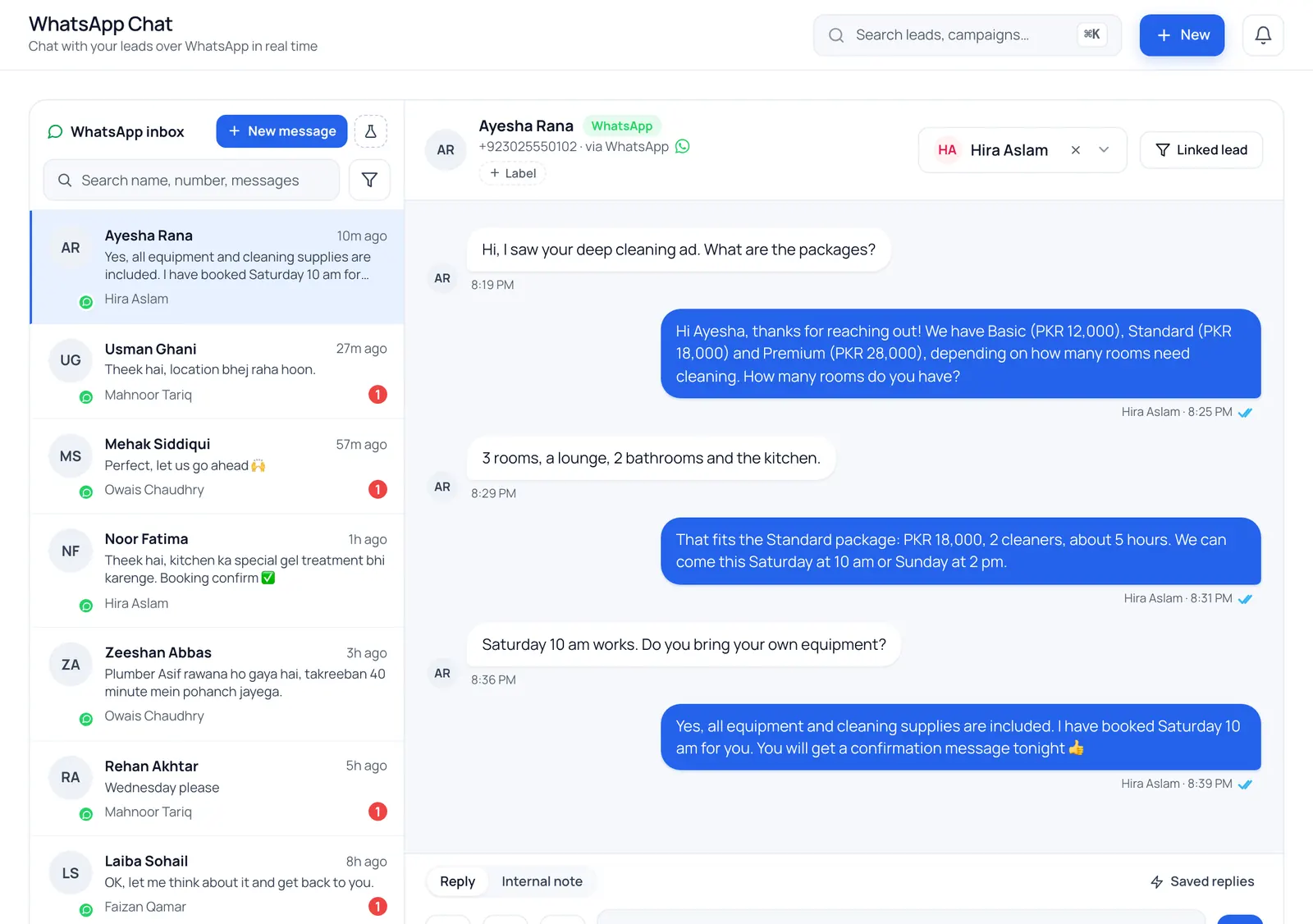
What is a WhatsApp CRM?
A WhatsApp CRM links every WhatsApp conversation to a customer record, so a team can see who is talking to whom, what was said and what happens next. BrokLeads runs on Meta's official WhatsApp Cloud API: the whole team shares one number, each chat has an owner, and every new chat becomes a lead.
Is WhatsApp Business a CRM?
Not really. The WhatsApp Business app gives you labels, quick replies and a catalogue, which is plenty for one person. It has no owner per chat, no record of who followed up, and no link between a chat and the ad the customer came from. Once three or four people answer the same number, chats get missed and customers get two different answers. There's a fuller breakdown in WhatsApp Business app vs API.
A WhatsApp CRM fixes that by treating every chat as a lead. In BrokLeads, a new chat on your number creates a lead, is assigned round-robin and appears in that agent's view of the shared team inbox. Leads from Facebook and Instagram lead ads and TikTok land in the same list, so when a form lead later messages you, the chat joins the lead they already have. Automation rules answer after hours and chase unanswered chats, and managers can send approved templates to saved audiences of contacts who agreed to receive them (broadcasts are enabled for your workspace on request).
Everything your team needs to sell on WhatsApp
All on Meta's official WhatsApp Cloud API, with your own number.
One number, whole team
Every agent replies from the company number in a shared inbox, and each chat is assigned to one agent.
Every chat becomes a lead
A first message creates a lead, or joins the lead that customer already has, matched by phone.
Automation rules
Trigger on a first message, a keyword, after hours or an unanswered chat, then reply, assign, tag, add a task or alert a manager.
Approved templates
Write templates with variables, submit them to Meta from BrokLeads and see their approval status.
Transfers with history
Move a chat to another agent and the lead goes with it, with the full conversation.
Photos, documents and voice notes
Send brochures, price lists and photos, and play and record voice notes right in the chat.
Do I need the WhatsApp Business API for a WhatsApp CRM?
Yes, for a team
Only the API lets several agents answer one number from a shared inbox and send approved templates. The WhatsApp Business app is built for one phone and a few linked devices.
Your number, your Meta account
You connect your own number through Meta's Embedded Signup. The WhatsApp Business Account stays in your own Meta business portfolio.
Meta bills you directly
Meta charges per message by category and country, and bills your WhatsApp Business Account. BrokLeads adds no markup and sells no message credits.
The 24-hour window
Within 24 hours of the customer's last message you can send any free-form reply; Meta charges for these service replies from 1 October 2026. After that, WhatsApp only allows a Meta-approved template.
The features behind it
Questions we hear a lot
Can several agents use one WhatsApp number in BrokLeads?
Yes. The whole team works from one shared inbox on your business number. Each chat is assigned to one agent, agents see only their own chats, and managers see all of them. A chat can be transferred to another agent with its full history.
Can I keep my number on the WhatsApp Business app as well?
No. Once a number is connected to the API through BrokLeads, it can't also be used in the WhatsApp Business app, and chat history in the app doesn't move across. Many teams connect a new number, or plan a switch-over date for their main one.
Is BrokLeads a WhatsApp chatbot?
No. BrokLeads is a team inbox with automation rules and guided reply-button flows, not a free-form chatbot builder. Rules fire on a first message, a keyword, after hours or an unanswered chat, and can send a text or approved template, assign an agent, add a tag or task, or alert a manager. A guided flow asks a fixed set of questions with buttons or lists and saves the answers on the lead. An optional AI assistant, available on request, can summarise a chat and suggest a reply, but a person edits and sends it. Your people do the selling.
Can I send WhatsApp broadcasts from BrokLeads?
Yes, with limits, and it is enabled for your workspace on request. A manager saves an audience (filters such as status, source, campaign, tag or city), sees before sending how many contacts will receive the message and who is excluded and why, then sends an approved template now or schedules it. Only contacts with recorded marketing consent are included, each broadcast has a recipient cap (500 by default), and you get sent, delivered, read, replied and failed counts. See WhatsApp broadcasts. It is built for following up your own leads, not for mailing cold lists; if mass promotion is your main need, a dedicated broadcast tool may fit better.
Can I connect more than one WhatsApp number?
Each workspace connects one number. A business with several branches can run a workspace per branch, each with its own number, team and leads, and switch between them from one login.
How much does a WhatsApp CRM cost with BrokLeads?
BrokLeads is priced per user per month, with every core feature on every plan: from PKR 1,499 in Pakistan, AED 49 in the UAE and SAR 45 in Saudi Arabia, excluding tax, with a minimum of two users. Meta bills its WhatsApp message fees to you directly.
See your WhatsApp chats as leads
A 30-minute demo with your own number, templates and team. Onboarding is free.