
WhatsApp Business API, connected to your sales team
The WhatsApp Business API, usually just called the WhatsApp API, is how a team, not just one phone, answers a business number. BrokLeads connects your own number to Meta's official Cloud API, then gives you a shared inbox, approved templates, auto-replies and a lead CRM on top.
What is the WhatsApp Business API?
The WhatsApp Business API, now Meta's WhatsApp Cloud API, lets software send and receive WhatsApp messages on a business number. It has no app of its own: you use it through a platform such as BrokLeads, which adds a shared team inbox, approved templates, auto-replies and a CRM. Meta charges per message; access itself is free.
How does Meta charge for WhatsApp messages?
Meta charges per message, not per month. The price depends on the message category (marketing, utility or authentication templates) and the country of the person you're messaging, and Meta updates its rate card from time to time. Until 30 September 2026, replies inside the 24-hour customer service window were free; from 1 October 2026, Meta charges for these service messages too, so check Meta's current rate card before you budget. Our WhatsApp Business API pricing 2026 guide has the full breakdown.
Through BrokLeads, your WhatsApp Business Account stays in your own Meta business portfolio and Meta bills those fees to it directly. BrokLeads adds no markup: you pay Meta for messages and BrokLeads per user for the software, which turns the API into a WhatsApp CRM where every chat becomes a lead. For setup details by country, read the Pakistan, UAE and Saudi Arabia guides.
What BrokLeads adds on top of the API
The API is plumbing. This is the part your team actually uses.
Meta's Embedded Signup
Connect your own number through Meta's official signup window, from inside BrokLeads.
Shared team inbox
One number, every agent, and each chat assigned to one person.
Templates from BrokLeads
Write templates with variables, submit them to Meta and track approval.
Automation rules
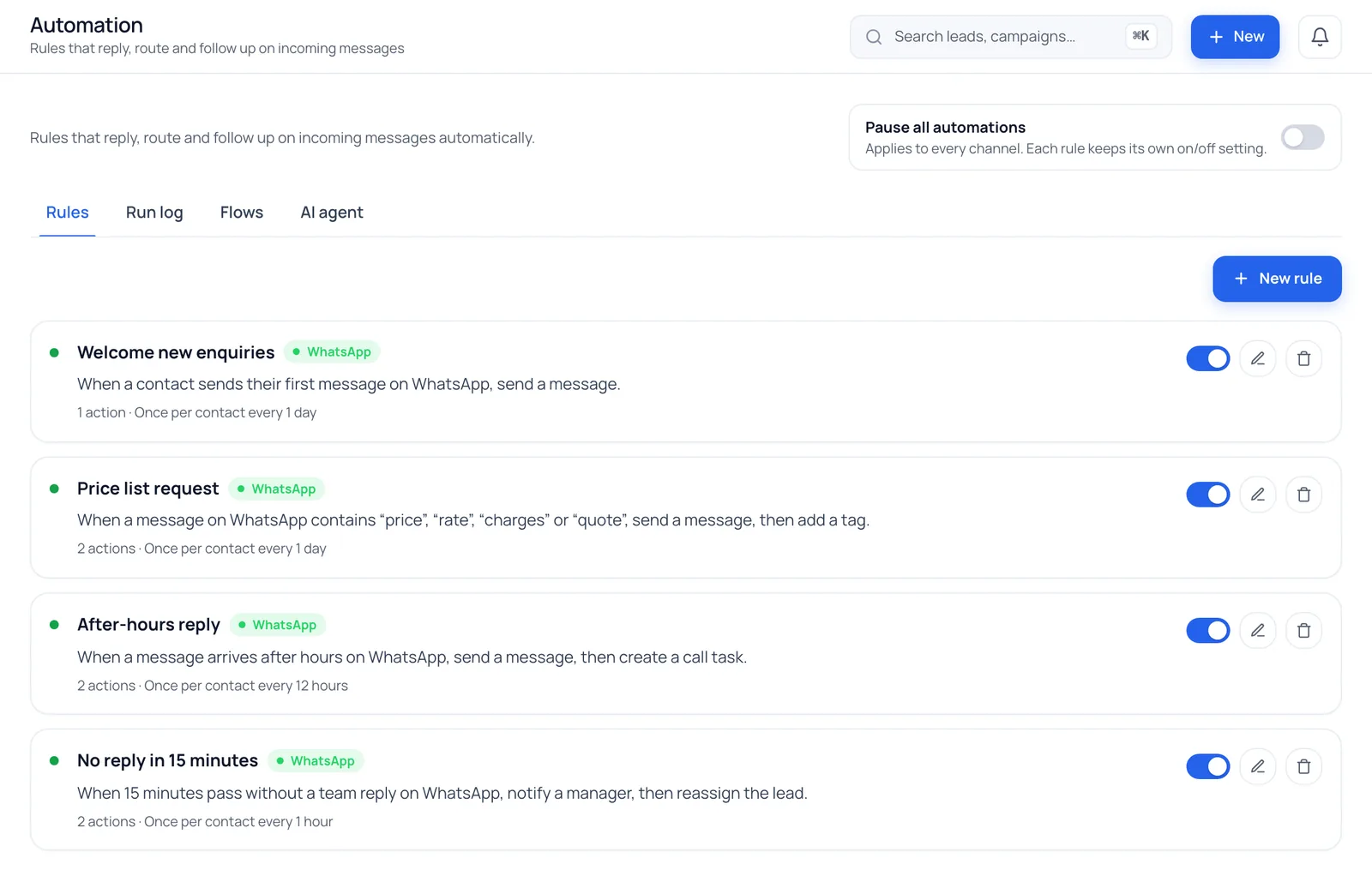
First-message, keyword, after-hours and no-reply triggers, with a run log of what fired and why.
Chats become leads
New chats create leads and go round-robin to the next agent.
Media both ways
Photos, videos and documents, plus voice notes you can play and record.
How do I get the WhatsApp Business API?
A Meta business portfolio
You need a Meta business portfolio (formerly Business Manager). If you already run Facebook or Instagram ads, you probably have one.
A number for the API
Use a number that isn't registered on WhatsApp, or delete its WhatsApp account from the app first. It must be able to receive a verification code by SMS or call.
Embedded Signup and display name
Start Meta's Embedded Signup from BrokLeads, pick your portfolio, add the number and choose a display name, which Meta reviews.
Payment method and templates
Add a payment method to your WhatsApp Business Account in Meta for message fees, then create your first templates and submit them for approval.
The features behind it
Questions we hear a lot
Is the WhatsApp Business API free?
Access to Meta's Cloud API is free, but messages aren't. Meta charges per template message by category and the recipient's country, and from 1 October 2026 it also charges for service replies inside the 24-hour window. You also pay for the software you use it through, such as BrokLeads.
Is the WhatsApp API the same as the WhatsApp Business API?
Yes. "WhatsApp API" is the short name most people use for the WhatsApp Business API, which Meta now offers as the WhatsApp Cloud API. It isn't the free WhatsApp Business app: the API has no app of its own, so a team uses it through a platform such as BrokLeads.
What is the difference between the WhatsApp Business app and the API?
The app is free and runs on one phone plus a few linked devices, with every reply typed by hand. The API has no app of its own; through a platform it lets a whole team share one number, send approved templates, use auto-replies and link chats to a CRM, and Meta charges per message.
Can I keep using my number on the WhatsApp Business app?
Not with BrokLeads today. A number connected to the API through BrokLeads can't also be used in the WhatsApp Business app. Meta offers a coexistence option through some providers, but BrokLeads doesn't support it yet, so plan the switch or use a new number.
Is BrokLeads a WhatsApp Business Solution Provider (BSP)?
No. BrokLeads is software built on Meta's official WhatsApp Cloud API. You connect your own number through Meta's Embedded Signup, your WhatsApp Business Account stays in your own Meta business portfolio, and Meta bills message fees to you directly, with no markup from us.
How long does setup take?
Connecting a number through Embedded Signup takes a few minutes once your Meta business portfolio is ready. Meta then reviews your display name and each template you submit; those reviews are Meta's and can take anywhere from minutes to a few days.
How much does BrokLeads cost on top of Meta's fees?
BrokLeads is priced per user per month and every plan includes every core feature: from PKR 1,499 in Pakistan, AED 49 in the UAE or SAR 45 in Saudi Arabia, excluding tax, with a minimum of two users. Meta's message fees are separate and billed by Meta; see WhatsApp messaging costs for Meta's rates for numbers in Pakistan.
Connect your WhatsApp number with our help
Book a 30-minute demo. Onboarding over video call is free, including the WhatsApp signup.