
Qualify WhatsApp leads with guided button and list flows
Ask new enquiries a few questions with WhatsApp reply buttons and lists. Their answers are saved onto the lead, so your agent starts the call already knowing the city, budget and timeline.
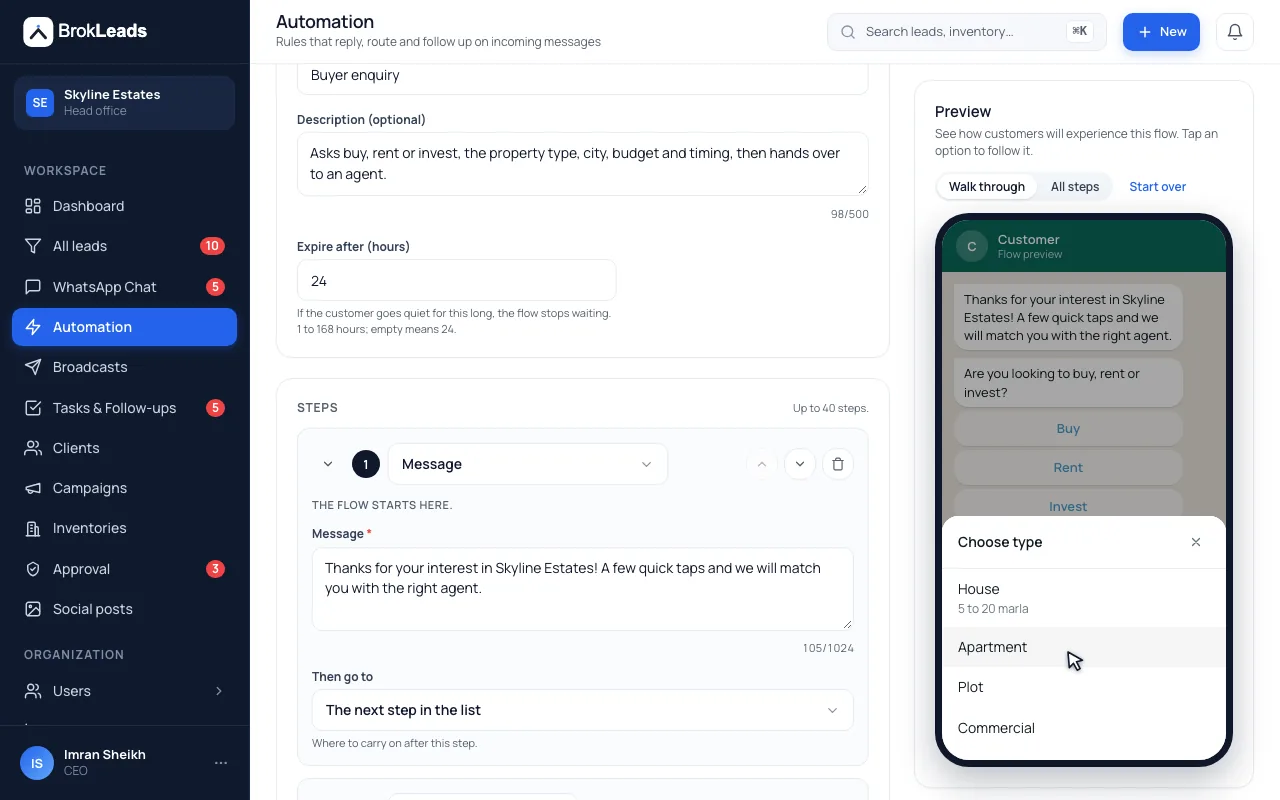
What is a guided flow on WhatsApp?
A guided flow is a short questionnaire a customer answers by tapping WhatsApp reply buttons or choosing from a list. BrokLeads saves each answer onto the lead, such as budget, city or timeline, and can then create a task, change the stage or hand the chat to an agent. It is a structured set of questions, not a free-form chatbot.
A questionnaire that qualifies the lead before the first call
Flows are built for the few questions every agent asks on every enquiry, so the answers are on the lead before a person picks up.
Ask with the buttons and lists WhatsApp supports
Each step can be a message, a question the customer types an answer to, up to three reply buttons or a list of up to ten rows. A flow can have up to 40 steps and branch on the answer. Starters save time: buyer and rent enquiry flows for real estate workspaces, and a general new-enquiry flow for everyone else.
- 3 buttons or 10 list rows per step, as WhatsApp allows
- Up to 40 steps per flow, with branches
- You edit the starters: they are copied in unpublished
- Ask
- What are you looking for? (typed answer)
- Ask
- Roughly what is your budget? (typed answer)
- Buttons
- When would you like to get started? As soon as possible · Within a month · Just browsing
- Then
- Create a call task, move the lead to Contacted and hand over to an agent
Every answer lands on the lead record
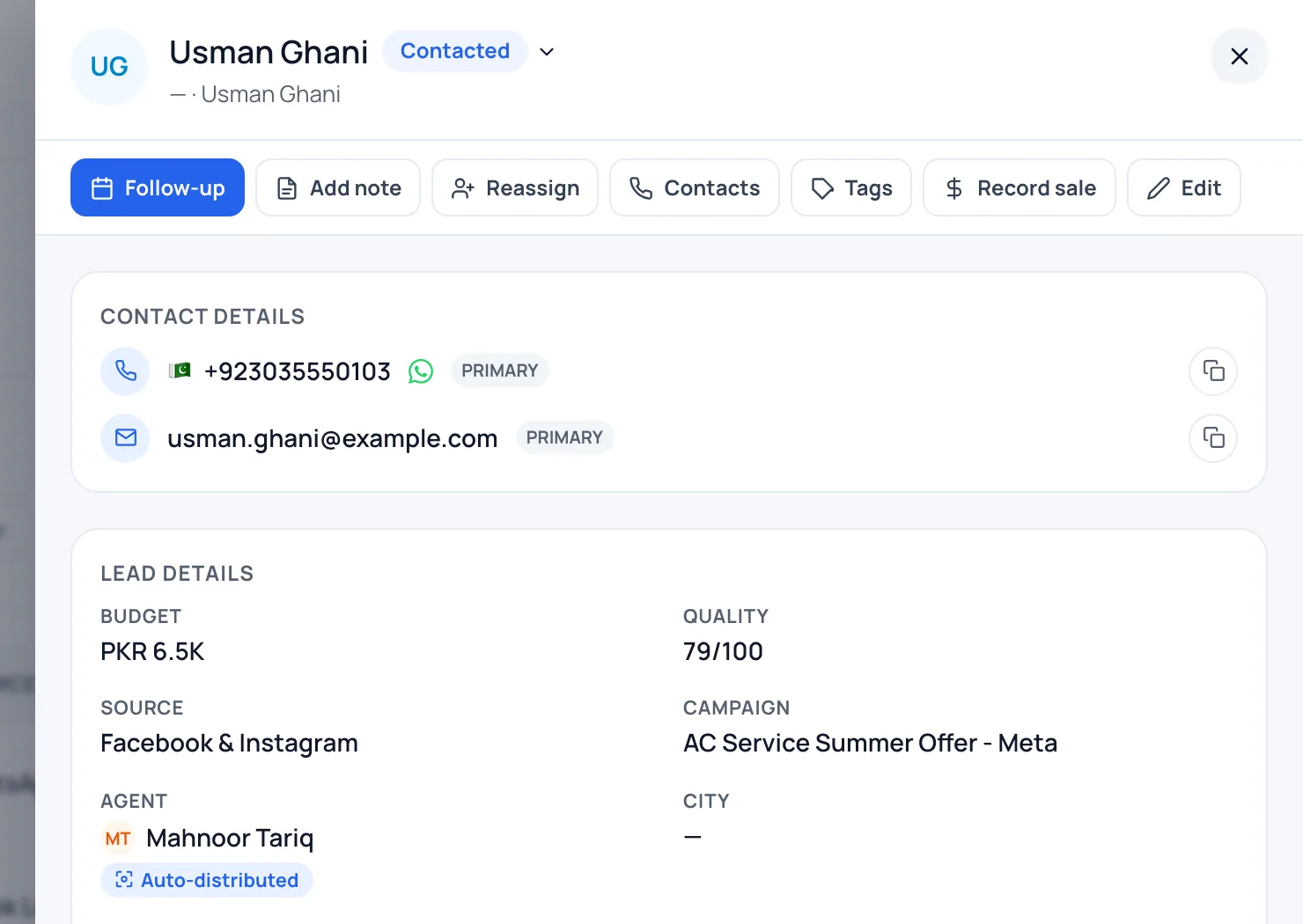
Answers are saved to the lead's own fields: budget, city, interest, timeline and language, plus property type and purpose in real estate workspaces. A step can then create a follow-up task, move the lead to another stage or hand the chat to an agent, so the person who calls sees the answers instead of asking again.
- Budget, city, interest, timeline and language saved to the lead
- Follow-up task, stage change and handover as steps
- The agent sees the answers on the lead, in the same place as the chat
Start it from a rule, and see where people drop off
A flow starts from an automation rule, for example on a customer's first message or a keyword. If the customer stops answering, the flow closes by itself after its timeout, 24 hours unless you change it. Each flow has a report of how many started, completed, were handed over and were abandoned, and which step people stopped at.
- Starts from an automation rule: first message, keyword, after hours and more
- Timeout from 1 hour to 7 days; abandoned flows close automatically
- Report: started, completed, handed over, abandoned, and the step people stopped at
- Started
- Conversations the flow began on
- Completed / Handed over
- Customers who reached the end or were passed to an agent
- Abandoned
- Customers who stopped answering until the timeout
- Waiting at step
- Which question people stopped at, so you can reword it
Five steps from starter to report
- 1
Start from a template flow
Copy a starter (new enquiry, or buyer and rent for real estate) or build your own.
- 2
Edit the questions
Write each question, add up to three buttons or ten list rows, and choose which lead field each answer is saved to.
- 3
Add what happens next
Add a follow-up task, a stage change and a handover to an agent at the end.
- 4
Publish and attach it to a rule
Publish the flow, then add a “start a guided flow” action to an automation rule.
- 5
Read the report
See how many started and finished and where people stop, then reword the question that loses them.
Who it suits, and what it does not do
A good fit if
- Teams whose agents ask the same three to five qualifying questions on every new enquiry
- Businesses that want budget, city and timeline on the lead before the first call
- Teams that lose time because agents ask different questions, or forget to ask
What it does not do
- It is a guided questionnaire, not a chatbot builder. It does not hold a free conversation or interpret open-ended answers.
- It is WhatsApp only, and a flow starts only inside the 24-hour window after the customer writes. It never sends marketing content.
- Only one flow runs on a chat at a time.
- A flow does not start by itself: it needs an automation rule to start it.
Questions about guided flows
How do I qualify WhatsApp leads automatically?
Build a guided flow with reply buttons, list questions and typed questions, then start it from an automation rule when a new customer writes in. Each answer is saved onto the lead, so the agent sees budget, city and timeline before calling.
Is this a WhatsApp chatbot builder?
No. Guided flows are a questionnaire with a fixed set of steps. They do not hold a free conversation or interpret open-ended replies, and there is no free-form canvas.
What WhatsApp limits apply to the buttons and lists?
A step can have up to three reply buttons or one list of up to ten rows. Button titles can be up to 20 characters and list row titles up to 24, which are WhatsApp's own limits, and a flow can have up to 40 steps.
Where do the customer's answers go?
Onto the lead record: budget, city, interest, timeline and language, plus property type and purpose in real estate workspaces. You choose which field each question saves to.
What happens if the customer stops replying?
The flow closes by itself after its timeout, which is 24 hours unless you set it between 1 hour and 7 days, and it counts as abandoned in the report.
Can a flow hand the chat to an agent?
Yes. A handover step passes the chat to an agent, and the starters also create a call task and move the lead to the Contacted stage.
Can I send a flow to old leads?
No. A flow starts from a rule when a customer writes in, inside WhatsApp's 24-hour window, and it never sends marketing content. To reach older leads, use a broadcast with an approved template; broadcasts are enabled for your workspace on request.
Are there ready-made flows?
Yes. Real estate workspaces get buyer and rent enquiry starters, and every other workspace gets a general new-enquiry starter. You copy a starter in, edit it and publish it.
Works with
See a qualification flow on a phone
See BrokLeads with your own leads and team in a 30-minute walkthrough. Onboarding is free.