
WhatsApp broadcasts to the right leads, with a pre-send check
Build an audience from your leads, pick an approved template and read exactly who will receive it and who is left out before anything goes. Send now or schedule it, then follow delivered, read and replied. Broadcasts are enabled for your workspace on request.
How do WhatsApp broadcasts work in BrokLeads?
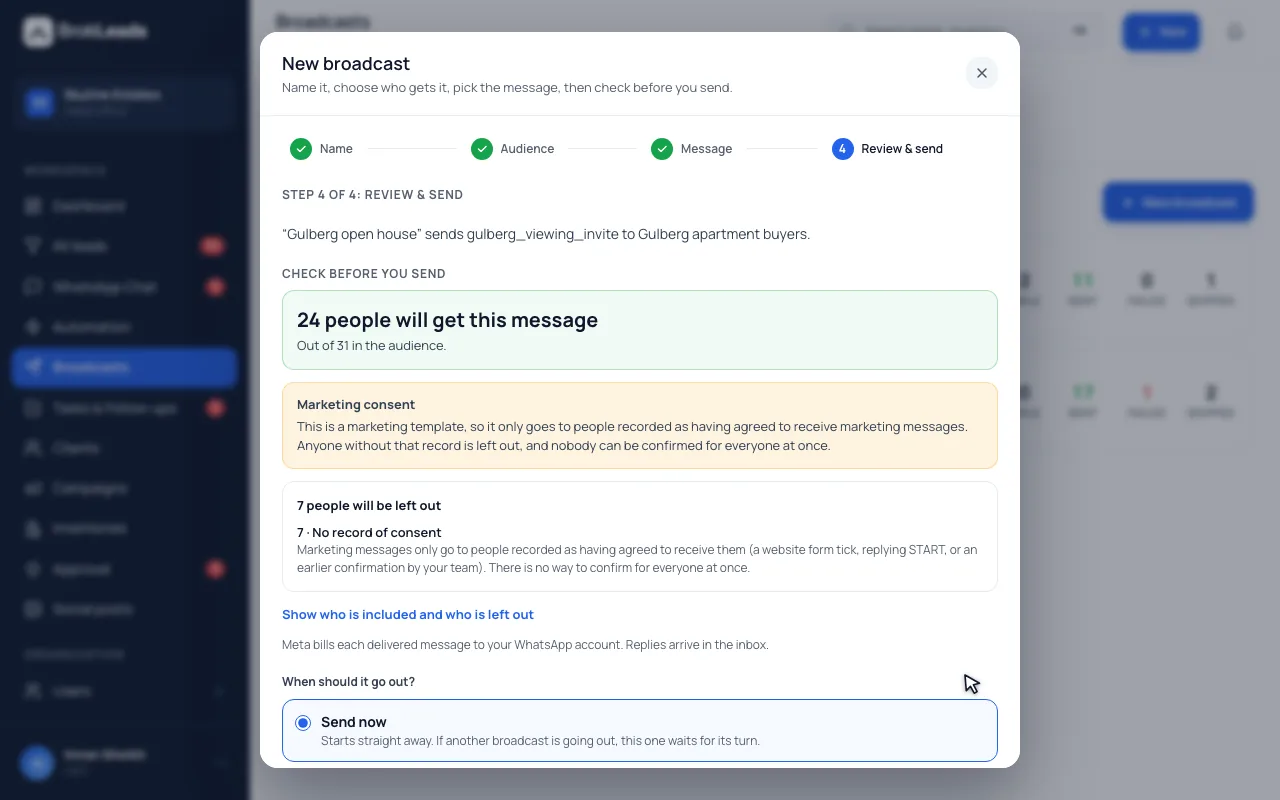
You save an audience of leads using filters such as status, source, city, tag, assigned agent and last contact, then choose a Meta-approved template. A pre-send check shows how many people will receive it and how many are excluded, for example for no consent or no number. You then send now or schedule it, and follow sent, delivered, read and replied counts. Broadcasts are enabled for your workspace on request, so ask for them when you book a demo or during onboarding.
Audiences, a pre-send check and results
Broadcasts are built for follow-up with customers who have agreed to hear from you, not for blasting a list.
Save an audience once and reuse it
An audience is a set of filters over your leads: status, source, city, tag, assigned agent and how long since you last contacted them. Name it, save it and reuse it for every campaign. It is evaluated against the leads its creator is allowed to see, both when you save it and again at send time.
- Filters: status, source, city, tag, assigned agent, last contacted
- An audience can only reach leads its creator can see
- Only people with a WhatsApp number can be messaged
See who is left out, and why, before you send
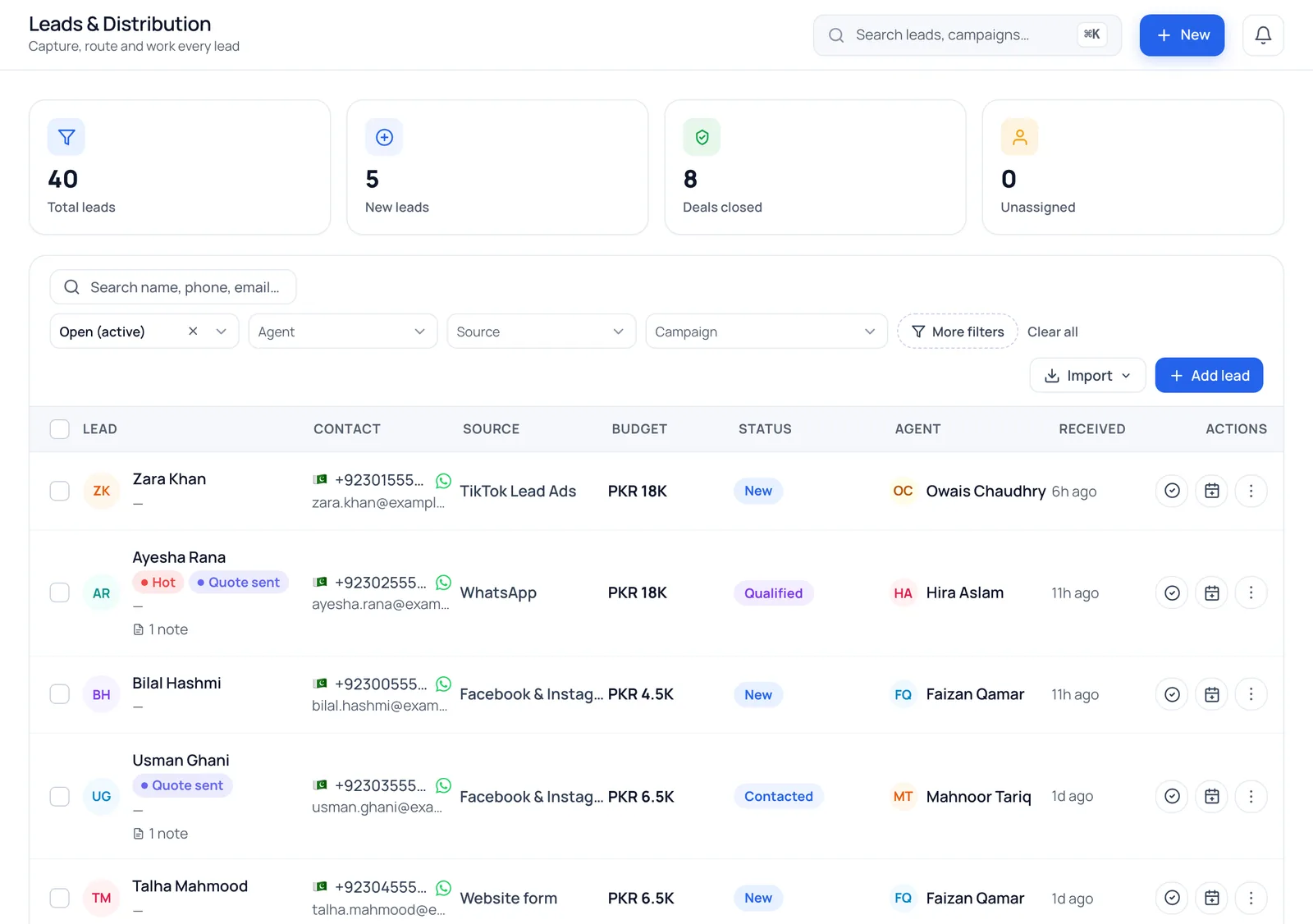
Before anything goes, the check shows how many people are in the audience, how many will receive the message and how many are excluded, grouped by reason: no WhatsApp number, a duplicate number in the same send, no recorded marketing consent, or an opt-out. A customer who replies STOP is opted out automatically, and consent is checked again at the moment of sending.
- Marketing templates only go to contacts with recorded consent
- STOP, unsubscribe and opt-out replies switch marketing off for that contact
- A limit per broadcast (500 by default) keeps a mistaken click bounded
- Audience
- Everyone your filters match
- Will receive
- Contacts with a number and, for marketing templates, recorded consent
- Left out
- No number, duplicate number, no consent, opted out
- Preview
- The first people on the list, with the reason next to each exclusion
Send now or schedule it, then read the results
Pick a template Meta has approved, fill its variables from each lead's details and send now or choose a date and time. Messages go out in small, paced batches, and you can cancel part-way. Each broadcast reports sent, delivered, read, replied within seven days and failed, with the status of every person.
- Templates only: no free-text broadcasts
- Cancel a send; people not yet reached are marked cancelled
- Replies are counted for seven days after the message
- Sent / Delivered / Read
- From WhatsApp's message statuses
- Replied
- People who wrote back within seven days
- Failed
- Messages WhatsApp did not accept, with the reason
- By person
- Each recipient's status, so you can follow up one by one
See an estimate of Meta's fee before you send
Before a broadcast goes out, you see an estimate of what Meta will charge: its list price for the template's category, by the country of each recipient, assuming every message is delivered. You confirm it before the broadcast starts, and a scheduled broadcast whose audience has grown noticeably by send time pauses until you confirm the new figure. The estimate covers numbers in Pakistan, the UAE and Saudi Arabia; for any other country it says the price is unavailable rather than guessing. It is not a bill: Meta bills your WhatsApp Business Account directly, and the real charge can differ, for example because of taxes or volume discounts.
- The estimate is shown and confirmed before sending, scheduling or launching a draft
- Pakistan, the UAE and Saudi Arabia only; other countries show no price
- Meta bills you directly; the estimate is not a bill
Sending pauses by itself when your number needs it
Broadcasts go out in small, paced batches. If Meta rates the number's quality as low, the number reaches its messaging limit, or Meta reports a billing or account problem, the broadcast pauses with the reason shown, and the people not yet reached stay in the queue. Only an owner or a manager can start a broadcast or resume a paused one. Replies from customers come into the normal inbox, assigned like any other chat, and people who opt out are left out of later marketing broadcasts.
- Pauses with a reason: low quality rating, messaging limit, billing or account problem
- Only owners and managers can start a broadcast
- Replies land in the normal inbox; opt-outs are honoured
Five steps from audience to results
- 1
Save an audience
Filter your leads by status, source, city, tag, agent or last contact, and save the filter with a name.
- 2
Choose an approved template
Pick a template Meta has approved and fill its variables from each lead's details.
- 3
Run the pre-send check
Read how many will receive it and who is excluded, and why. Narrow the audience if it is over the limit.
- 4
Send now or schedule
Send immediately or set a date and time. You can cancel while it is going out.
- 5
Read the results
Follow sent, delivered, read, replied and failed, and follow up with the people who replied.
Who it suits, and what it does not do
A good fit if
- Teams with customers who have opted in, for example by ticking the box on a website form or by confirming to an agent
- Businesses sending an offer, an event reminder or a follow-up to a clearly defined group
- Owners who want to see exactly who is excluded before a message goes out
What it does not do
- It is not switched on by default. We enable broadcasts for your workspace on request, on any plan, and the free trial does not include them unless we enable them for the trial workspace.
- It is not a bulk sender for any list. Marketing templates only go to contacts with recorded consent, and contacts imported from a file start without it.
- Only templates Meta has approved can be broadcast. There are no free-text broadcasts.
- There is a limit per broadcast, 500 recipients by default (the BrokLeads team can change it), and Meta's own messaging limits apply on top.
- It needs your WhatsApp number connected. Meta bills WhatsApp messages to you directly, with no BrokLeads markup; rates are on the WhatsApp messaging costs section of the pricing page.
Questions about WhatsApp broadcasts
Are WhatsApp broadcasts switched on automatically?
No. Broadcasts are enabled for your workspace on request, on any plan: ask us when you book a demo or during onboarding. Until we enable them for your workspace, broadcasts are not available in it. This includes the free trial, where broadcasts are off unless we enable them for your trial workspace on request.
Can I send a WhatsApp broadcast to my whole contact list?
No, and that is deliberate. Marketing messages only go to contacts whose consent is recorded in BrokLeads, because Meta can block numbers that message people who have not agreed. Contacts without consent, without a number, who have opted out or who appear twice are left out, and the pre-send check lists them before you send.
Can I schedule a WhatsApp broadcast?
Yes. After the pre-send check you can send immediately or pick a date and time, and a scheduled broadcast goes out by itself. You can cancel it before or while it is sending.
How is marketing consent recorded?
Consent is recorded when a contact ticks the opt-in on your website form or when a team member confirms in the chat that the customer agreed. BrokLeads keeps who confirmed it, when and how, but it cannot verify the agreement itself, so only record consent you actually hold.
Which templates can I broadcast?
Only templates Meta has approved for your WhatsApp Business Account. Marketing-category templates are the ones gated by consent.
What stats does a broadcast show?
Sent, delivered, read, replied and failed, plus each recipient's status. A reply counts if the person writes back within seven days of the message.
Is there a limit on how many people I can message?
Yes. A broadcast can reach 500 recipients by default, and the BrokLeads team can change that limit. Meta's own daily messaging limits for your number also apply.
Who pays for WhatsApp broadcasts?
Meta bills WhatsApp messages directly to your WhatsApp Business Account at its published rates. BrokLeads adds no markup. See the WhatsApp messaging costs section for Meta's rates.
Can I broadcast to leads I imported from Excel?
Not until consent is recorded. Imported contacts start without marketing consent, so a marketing template is refused for them. See lead import for how imports are handled.
Will I see what a broadcast costs before it is sent?
You see an estimate and confirm it first. BrokLeads works it out from Meta's list price for the template's category and each recipient's country, for numbers in Pakistan, the UAE and Saudi Arabia. For other countries it says the price is unavailable. Meta bills your WhatsApp Business Account directly, so the actual charge can differ from the estimate.
Why would a broadcast pause?
A broadcast pauses by itself, with the reason shown, when Meta rates your number's quality as low, the number reaches its messaging limit, the audience has grown past the estimate you confirmed, or Meta reports a billing or account problem. People who have not been reached yet stay in the queue, and an owner or manager can resume it.
Who can send a broadcast?
Only owners and managers. Other roles cannot start a broadcast, and a broadcast only reaches leads that its creator is allowed to see.
What happens when someone replies to a broadcast or opts out?
A reply comes into the normal inbox and is assigned like any other chat. A customer who sends a stop word, or turns off marketing messages in WhatsApp, is marked as opted out and left out of later marketing broadcasts until they opt in again.
Works with
See a broadcast and its pre-send check
See BrokLeads with your own leads and team in a 30-minute walkthrough. Onboarding is free.