
Lead routing rules: send each lead to the right agent
Rules run in priority order. The first match sends the lead to an agent, a team or your pool, and a lead that matches no rule falls back to round-robin. A simulator shows what would happen, and every lead keeps a “Why this agent?” note.
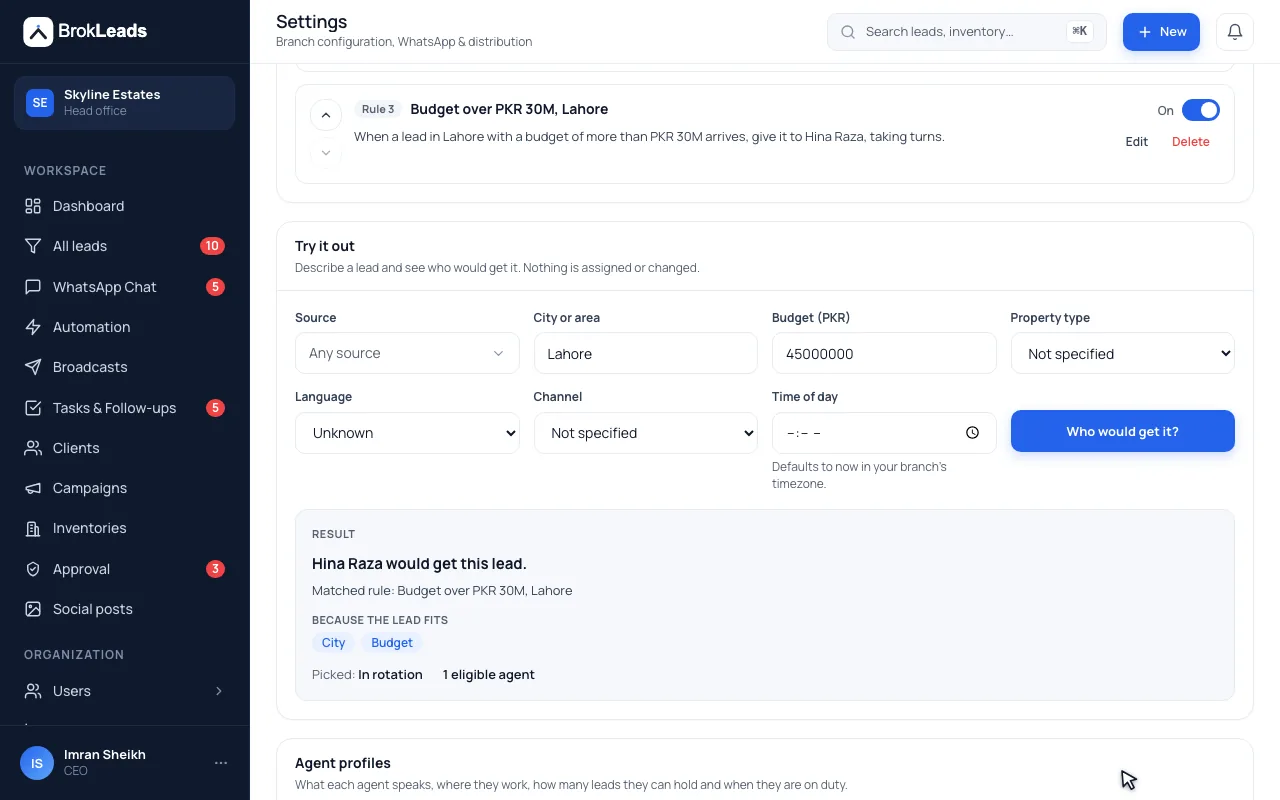
How does lead routing by rules work in BrokLeads?
You write rules that match a lead's source, city, budget, language, channel or time of day. When a lead arrives, the first matching rule in priority order picks an agent, team or the pool, skipping agents who are off duty, outside their hours or at their open-lead cap. A lead that matches no rule falls back to your normal round-robin, and the reason is stored on the lead.
Rules, fair picking and a reason for every assignment
Use rules for the special cases, such as big budgets, a language or a city, and leave the rest to round-robin.
Match on what you already know about the lead
A rule can combine source, city, budget (more than, less than or between, inclusive), language (guessed from the first message: English, Roman Urdu, Urdu or Arabic), channel (WhatsApp, Facebook, TikTok, website and more) and time of day. Real estate workspaces can also match on property type. All the conditions in a rule must match.
- Budget is read from Facebook and TikTok lead-form answers, so budget rules work for ad leads
- Rules run in the order you set, and the first match wins
- Rules can be reordered and switched off
- Rule 1
- Language is Arabic → the Arabic-speaking team
- Rule 2
- City is Lahore and budget is more than 5 crore → senior agents, fewest open leads
- Otherwise
- Your normal round-robin distribution
Pick the agent fairly, and only among agents who can take it
A rule's target is one agent, a team or the whole pool, using round-robin or fewest open leads. Agents who are inactive, off duty, outside their own hours, not accepting leads or at their open-lead cap are skipped. Each agent has a routing profile with languages, cities, an open-lead cap and available hours, and agents switch their own availability on or off.
- Strategies: round-robin or fewest open leads
- Prefer agents whose languages and cities fit the lead
- Agents toggle their own availability
- Off duty
- The agent switched their availability off
- Outside hours
- The lead arrived outside the agent's available hours
- At capacity
- The agent already has their maximum of open leads
- Not accepting
- The agent is marked as not taking leads
Test a rule first, and see why a lead went where it did
The simulator answers “what would happen to a lead like this?” without assigning anything or moving the rotation. On a real lead, “Why this agent?” shows which rule matched, how many agents were eligible and who was skipped and why, or that no rule matched and the default distribution ran.
- Simulate by source, city, budget, language, channel and time
- The explanation is stored on every routed lead
- Every routed assignment is recorded in the lead's activity history
- Rule matched
- Arabic leads (priority 1)
- Matched on
- language
- Skipped
- One agent, off duty
- Result
- Assigned by round-robin within the team
Four steps from profiles to explanations
- 1
Set up agent profiles
Give each agent their languages, cities, open-lead cap and hours, and let agents switch their own availability.
- 2
Write rules in priority order
Combine conditions, choose the target (agent, team or pool) and the strategy, then order the rules.
- 3
Run a lead through the simulator
Enter a source, city, budget, language, channel and time to see who would get it, without changing anything.
- 4
Let real leads flow
Read “Why this agent?” on any lead, and adjust the rules when the reasons are not what you expected.
Who it suits, and what it does not do
A good fit if
- Teams where different people handle different cities, budgets, languages or lead sources
- Owners who must explain why a lead went to a particular agent
- Businesses running Facebook and TikTok lead forms with a budget question
What it does not do
- Rules route new, unassigned leads when they arrive. They do not move a lead that already has an owner.
- If no rule matches, or nobody is eligible, the normal distribution runs: round-robin with caps.
- A language rule only matches when a language was recorded, which is guessed from the first message. A budget rule needs a budget on the lead.
- Rules are explicit conditions you write. There is no scoring or machine-learning matching.
Questions about lead routing rules
What is lead routing?
Lead routing sends each new lead to a chosen agent or team based on what you know about it, such as source, city, budget or language, instead of just the next person in line. In BrokLeads, rules run in priority order, the first match decides, and a lead that matches nothing falls back to round-robin.
How is lead routing different from round-robin distribution?
Round-robin shares leads fairly in turn, with caps (see lead distribution); routing rules decide who is eligible first, by source, city, budget, language, channel or time of day. Most teams use rules for the special cases and round-robin for the rest.
Can I route leads by budget?
Yes. A budget condition can be more than, less than or between two amounts, inclusive. For Facebook and TikTok leads, BrokLeads reads the budget from a form question named like “budget”; ranges use the upper bound and text such as “50 lac – 1 crore” is understood.
Can I send Arabic or Urdu speakers to the right agent?
Yes. A language rule matches the language BrokLeads guessed from the customer's first message: English, Roman Urdu, Urdu or Arabic. Agent profiles also list the languages each person speaks, and a rule can prefer agents whose profile fits.
Can I test a rule before it affects real leads?
Yes. The simulator shows who would get a lead with the source, city, budget, language, channel and time you enter. It assigns nothing and does not move any rotation.
How do I know why a lead went to an agent?
Open the lead and read “Why this agent?”. It shows the rule that matched and what it matched on, how many agents were eligible and who was skipped and why, or that no rule matched and the default distribution ran.
What if an agent is on leave?
Agents who are inactive, off duty, outside their hours, not accepting leads or at their open-lead cap are skipped, and the explanation records it. Agents can switch their own availability, and managers can reassign any lead.
Do routing rules move leads that already have an agent?
No. Rules decide the owner of a new, unassigned lead when it arrives. Managers can still reassign a lead at any time, and every change is recorded in the activity log.
Works with
See a routing rule decide a real lead
See BrokLeads with your own leads and team in a 30-minute walkthrough. Onboarding is free.